You may have had a genealogically-inclined relative (many families seem to have one or two) sit down with you at one point or another and roll out a large taped-together “scroll” with names and dates, or scrawl one down in ballpoint pen on a napkin during a family reunion.
This does a satisfactory job of showing who is related to who, but when you’re looking for a cleaner demonstration of where you came from, there are other options. In a recent newsletter update from Geni.com, a site used by many Estonians to document their family members' names and vitals, there was news that one could now see their family tree in a fan chart view.
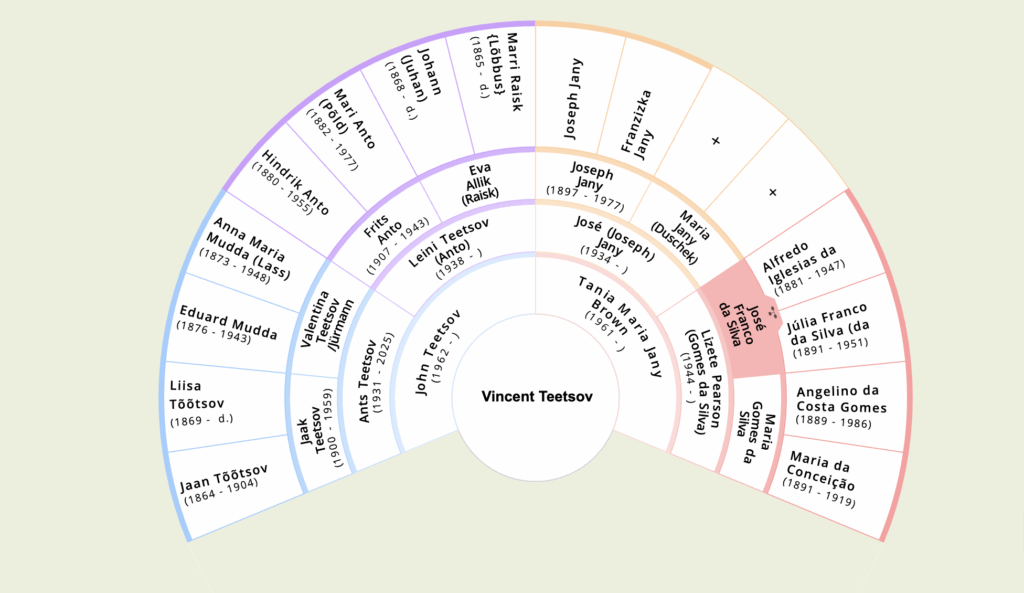
How can you do this? It’s very easy. Once logged in, click “Tree” in the top taskbar. Then click the square in the bottom right corner. When you click this, three more squares will appear: one shows the traditional wide family tree that’s likely your default view. Then there’s a sideways family tree option that allows you to move towards the right to see parents going back through the generations. This view is quite nice because you can see photos while also looking at a large scale. These first two options are sometimes known as “pedigree charts.” The third option shows a semi circle, the aforementioned fan. This view is helpful on account of how paired down it is. No photos, no distracting symbols floating around each person, just names and dates packed neatly together. You can see each generation all at once, on both of your parents’ sides, without having to scroll around.